

Who we serve
For teams who keep projects moving.
Permitting and planning happen at your desk, out in the field, one record at a time. CommunityWorks is built for the people who move the work: plan reviewers, planners, and inspectors.
Built for your role
See CommunityWorks from where you sit
Planning & Permitting Staff
Review and permit without the paper chase
The application, its history, and every decision live in one record, so your day is the review, not the reassembly.
- Guided intake means applications arrive complete, not bounced back on day one.
- Mark up plans and set conditions on-screen, no printouts, no red pen.
- Letters and notices draft themselves from what's already in the file.
- A queue that surfaces what's stuck, so nothing ages out of sight.
Planners
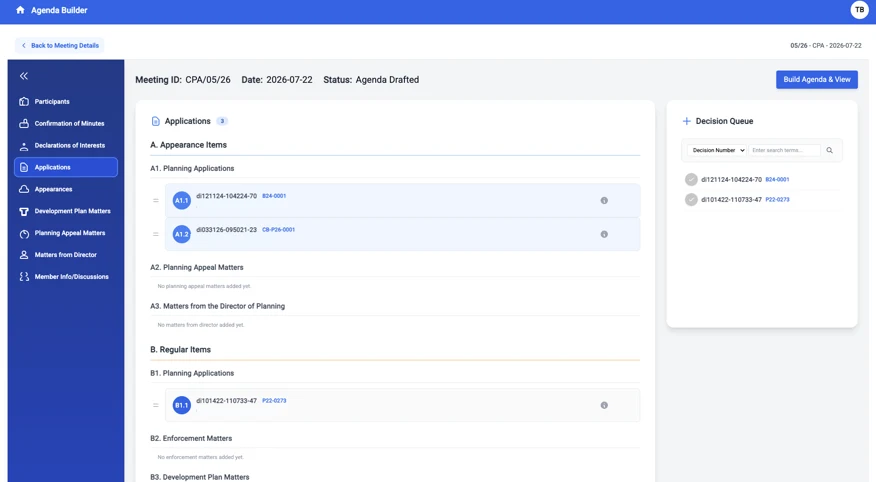
From record to published agenda, without the Word document
Move a case from your desk to a Planning Commission agenda and out to the public in a few clicks.
- Add a record to a Planning Commission agenda without rebuilding a Word doc.
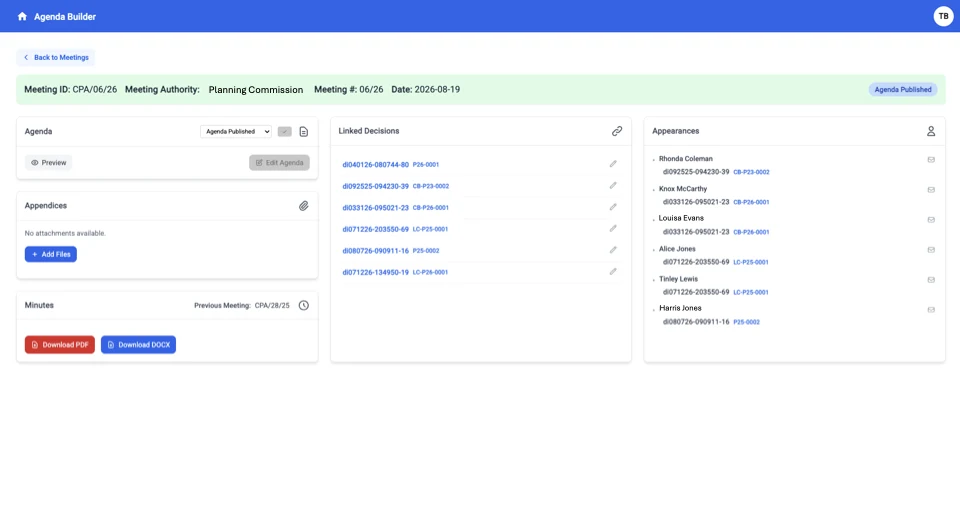
- Publish the agenda straight to your department's website for full transparency.
- Attendees are notified automatically when you add them to the agenda.
- Every case carries its full history into the hearing.
Inspectors
Scheduled, routed, and closed out in the field
Plan your day and finish your inspections on site, the record is current before you leave.
- See your inspection schedule and plan the day's route from one place.
- Complete inspections from a tablet on site, with photos and notes on the record.
- Results post in real time: applicants get their report without waiting on the office.
- No paper to re-key when you get back.
How it helps
Built around the work you do
Every capability earns its place by making one part of your day easier. Make your day about the projects, not chasing paper.

Guided intake
Catches missing pieces at submission, so you're not sending applications back on day one.
One record per application
Documents, history, and status in one place, so you stop reassembling the story every time.
A queue that shows what's stuck
Surfaces aging and blocked work, so nothing slips because it fell to the bottom.
Omnichannel service requests
Residents reach you through the platform's channels, so requests land as trackable records, not voicemails.
Correspondence from the record
Drafts letters and notices from the file, so routine writing stops eating your afternoon.
Field inspections from your device
Schedule, route, and complete inspections from a tablet on site, so results and photos post to the record in real time, no re-entry back at the office.
Meetings & agendas
From record to published agenda, without the Word document
Build the agenda from your records. Add cases straight from the queue, no rebuilding a Word document every time it changes.
Publish for full transparency. The agenda goes live with its linked decisions and appearances attached, the community sees it in full.
Attendees are notified automatically. Add someone to the agenda and the system tells them they're on it, no separate emails to chase.
You're set up to succeed
A tool you can live in every day
Because software you use all day has to earn your trust, not just your login.
Support that knows permitting
Help from people who understand plan review and the counter, not a generic ticket queue.
Training that respects your time
Onboarding built around the fact that you have a job to do while you learn the tool.
The records stay yours
You own your data, with no vendor lock-in. What you build here is yours to keep.
See it the way you'd use it